Icon of program: WebDrive

WebDrive for Windows

  • Free
  • 4.2
    31
  • 7K
  • V1.1.18
Free Download for Windows

View an ad to download for free

Mount an FTP server as a local device

Imagine if you could mount an FTP server on your desktop so you could access it like any other local drive.

Top Recommended Alternative

You can with WebDrive which integrates SFTP, WebDAV, FTP, FTPS, or GroupDrive servers into Windows Explorer by simply mounting the server as a local device. This allows you much easier access to an FTP site than having to go via an FTP client all the time. It doesn't mean you lose out on security either as WebDrive supports SSL and SSH encryption and Digest Authentication support for WebDAV servers.

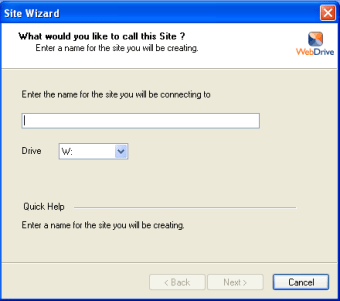
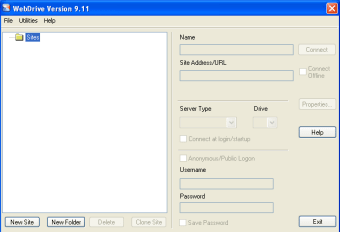
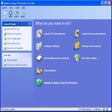
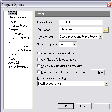
The setup process is very simple even for those unfamiliar with FTP clients. Just enter the name you want to assign to the drive, a username and password, a Host Name and IP address and the Initial Remote Directory. Once you're ready to connect, just click on the Site Profile you've created and click Mount. If WebDrive is able to connect, it will display the name of the serve in Finder like any other local drive.

Accessing an FTP server via Windows Explorer is so much more convenient that having to resort to an FTP client and it's particularly ideal for those that are unfamiliar with how such clients work.

If you want easier access to your FTP server, WebDrive is ideal for FTP beginners.

# Fixed: keyboard-interactive authentication was not being honored # Updated: New version of SFTP Engine. # Updated: New version of WebDAV Engine

  • Pros

    • Makes FTP servers more accessible
    • Easy to setup
    • Supports secure connections
  • Cons

    • May not work with all FTP servers
 0/3

App specs

Also available in other platforms

Program available in other languages


Icon of program: WebDrive

WebDrive for PC

  • Free
  • 4.2
    31
  • 7K
  • V1.1.18
Free Download for PC

View an ad to download for free


User reviews about WebDrive

4.2

8 reviews

Add review

Main reviews for you

  • Anonymous user

    I am very impressed with Webdrive. I regularly backup an iPad app called Notebooks to a Windows 10 PC using Webdav sync. For several years, I have used Netdrive with mixed results. I could only get Version 1 to work - and now that version is producing errors on startup. I found favorable reviews on Webdrive - so installed the Webdrive 64 V19.00-5345 Demo. Webdrive was very intuitive to setup and synced flawlessly with my iPad Air 2 the first time. Webdrive is now my go-to Webdav program.

  • Anonymous user

    The WebDrive software may be the key to solve one of the greatest issue faced by people who work with remote files. Often it is needed to compare the content of folders between local and remote, and oftentime between remote and remote. In the latter case many software fail, because they only allow one remote source. By using WebDrive I am able to treat any remote server as just another hard drive on my computer, fixing this issue forever.

  • Anonymous user

    Absolutely fantastic!All my online storage, in one place, with a super easy interface.Couldn't be happier



  • Anonymous user

    Indispensable, and unique.. I've been using WebDrive for years now. When I recently upgraded to Windows 10 I did look for alternatives (more out of curiosity than anything else - I was always going to stick with WebDrive) and I couldn't find any! It just works, transparently. You want to work with a file on a remote server? No problem - with WebDrive it's exactly as though it was on your local disk, and that means that any utility you like (not just those which are network savvy) can be used. Sure, Filezilla works well, and is free, but after using WebDrive it all seems such an unnecessary fuss to have to *think* about where things are. With WebDrive, that server location is just another folder, and one less thing to think about. Worth every penny of its modest cost. Pros: Not having to think about transferring files around - just having them accessible.

  • Anonymous user

    The best way to share files and folders with mobile users. The best way to share files and folders with mobile users ... Just click on the drive letter and access or modify your files. Pros: No user formation needed at all

  • Anonymous user

    Best FTP Drive Mapping program around. I have been using Webdrive now for about 5 years and upgrade every time the program changes. I use it primarily to update my websites and have each of the most important ones mapped to a different drive letter. Working with a mapped drive is just like working on my own hard drive except for a slight delay. Once the drive is mapped using it is so transparent that I usually forget I am FTPing using mapped drive. I have used it to access cloud storage and it works flawlessly although this is not my primary use. Using Webdrive saves me a lot of time. It gives me the option of editing files directly on the server or changing them locally and then copying them to the mapped drive. I have tried sever other similar products but this one is the best. Pros: easy to map an FTP site to a drive lettertransparent use once site is mapped

More

You may also like

Alternatives to WebDrive

Explore Apps

Latest articles

Laws concerning the use of this software vary from country to country. We do not encourage or condone the use of this program if it is in violation of these laws.
Softonic

Is WebDrive safe?

100/100

Score result: Clean

This file passed a comprehensive security scan using VirusTotal technology. It is safe to download.

  • Virus free
  • Spyware free
  • Malware free
  • Verified by Security Partners

    VirusTotal logo

Scan Info

Last scan
Monday, July 6, 2026
Scan provider
VirusTotal · Full report

File Integrity

File
1.1.18.exe
SHA256
2a9572c8a58aeb6e4a21d5ff036e274f23e4c2c0fe710f4996e69e96be047ad5
SHA1
639e7c456b9c5587fcb7ab60d8436a3531791146

Softonic security commitment

WebDrive has been thoroughly scanned by our advanced security systems and verified by industry-leading partners. This file comes from the official developer and has passed all our security checks, showing no signs of viruses, malware, or spyware. For more information, visit our Security and Trust Center

Signed in to Softonic as